
If parts are counted once a year and purchase orders live in an email thread, you can find out about a shortage when the machine is already on the hoist. Gearbox keeps stock levels, purchase orders and parts usage connected, so your team can see what is available, what needs to be ordered and where parts are being used.
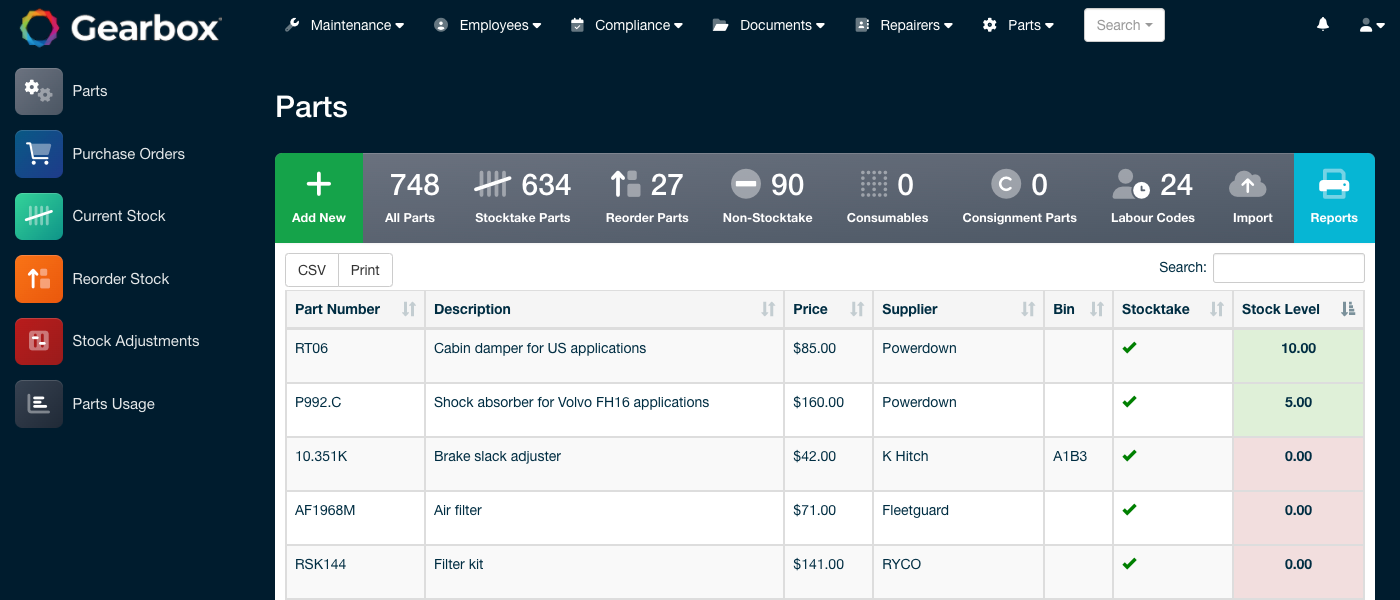
Track part numbers, descriptions, prices, suppliers, bin locations and stock levels in one place, with support for stocktake, reorder, non-stocktake, consumable and consignment parts. Import parts and price lists so costs stay current without retyping them.
Raise a purchase order directly from a work order so the parts are already tied to the job, or create a bulk order to receive parts into stock. Every part purchased and every part used is tracked, along with how its price has changed over time.
Gearbox holds current stock levels with reorder and maximum levels set per part, so a stocktake is a check rather than a rebuild.
Adjust levels for any part as you go, or in bulk at a year-end count.
Run inventory by site and transfer stock between sites, with every movement recorded.
See what has been used across work orders, by part and by asset, so unusual or recurring parts usage becomes visible.
Parts can be preconfigured against an asset to prefill the job card, so the right part is selected and costed without looking it up.
Purchase orders integrate with your accounting system, so the numbers are entered once.
See how Gearbox handles the day-to-day details of parts and inventory, with practical guides to each feature.
Parts carry their own traffic light wherever they appear, in the parts table and when picking parts on a service, repair or tyre job. Green is stock above the reorder level, orange is at or below it, red is zero or negative, grey is a part not tracked for stocktake.
Read the guideGive a part a barcode and scan it with the camera on a phone, tablet or webcam to identify it instantly during stocktakes, work orders and purchasing, instead of typing part numbers.
Read the guidePurchase orders are how parts are ordered and received into stock, with the date, supplier, vehicle and reference on the order. If you choose not to run purchase orders, stock adjustments are the alternative path.
Read the guidePrint a stocktake report with a blank column for the physical count, or enter adjustments directly on the stock adjustment page as you count. Most workshops use both: the report on the floor, the adjustments at the desk.
Read the guideSites act as stores or warehouses, each with its own stock levels. Receive parts into a site through a purchase order and transfer stock between sites, with every movement recorded.
Read the guideA part can hold an alternate part number alongside its main one, so an OEM number and an aftermarket equivalent find the same part and the same history.
Read the guideStart a free trial, or book a walkthrough with our team and we will set up a proof of concept using your own assets.