
 Prestart
Complete digital DVIRs from a phone, capture defects as they happen and send them straight into Gearbox for follow-up. Keep inspections, fault reports and asset records connected, wherever your fleet operates.

A paper form only helps if someone collects it, reads it and acts on it. If a defect is not reported to the maintenance team quickly, it can be missed until the next inspection or service. Gearbox puts the inspection, fault report and asset record together, so your team can see issues as they happen and act on them.
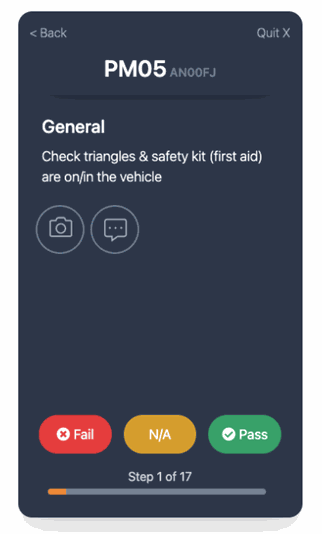
Operators answer one question at a time, so nothing gets skipped or signed off in a block. When a critical question fails, the app tells the operator not to use the equipment and to report to their supervisor immediately. The app works on Apple and Android and continues working offline when there is no signal.
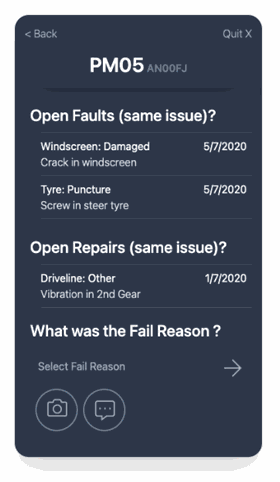
A failed question raises a fault report on the spot. The operator can select the reason, attach photos and add notes, then submit it directly to Gearbox. Your team can evaluate and prioritize the fault and turn it into a work order, so a defect becomes scheduled work rather than a note someone has to chase.
Attach a checklist to each asset, so the operator gets the right questions for the equipment they are checking.

Completed DVIRs, faults and odometer readings upload into Gearbox on completion, and those odometer readings update services due automatically.

Configure trucks and trailers for their mass limits. Operators record loads in the app and receive an overload alert by axle group and combination.

DVIRs, faults and overloads can be emailed from Gearbox as they occur, so your team can act the same day.

The app keeps working offline and uploads when the operator is back in range, making it practical for remote sites and long runs.

We supply self-adhesive DVIR labels for windshields and equipment to help with rollout, included with your subscription.
See how the app handles the day-to-day details of digital DVIRs, with practical guides to each feature.
Browse all DVIR guides in the knowledge baseA driver can select the vehicle by scanning a QR code on the windscreen instead of searching a list. The app remembers the last vehicle and trailers used, and a driver checking several machines in a day just changes the asset between checks.
Read the guideThe Prestart app uploads everything to Gearbox the moment a checklist or form is completed. Offline, it keeps working: the app flags unsynced data, shows a badge on the icon, sends a push reminder, and uploads automatically the next time it opens. A sync can also be triggered by hand.
Read the guideIf something breaks during the day, the driver does not run the whole checklist again. The Faults button raises a report on its own: pick the fault type and reason, add a note or photo, and on save it uploads to Gearbox and emails the nominated people.
Read the guideIf enabled, fit for duty is the first option in the app. Questions are answered one at a time with pass, fail or not applicable, a fail asks for the reason and notes, and the driver signs off at the end.
Read the guideDrivers record axle group weights against a mass scheme, GML, CML or HML, with the truck and trailer limits configured in Gearbox first. The app alerts if a vehicle or trailer has no limits set, and recent load sheets can be reviewed before starting a new one.
Read the guideEach asset carries exactly one DVIR checklist, assigned on the asset's settings in Gearbox. That is why the operator can never pick the wrong questions: choosing the machine chooses the checklist.
Read the guideStart a free trial, or book a walkthrough with our team and we will set up a proof of concept using your own assets.